EnglishEN
Download D.A.V.E.Mac and Windows

Dave vs other agents

What they have in common and how they differ

D.A.V.E.
Hermes, bb
D.A.V.E., Hermes, bb
A shell over Claude Code, Codex and others

All three control the computer and the browser, work with files and write code

D.A.V.E.
A partner co-founder’s brain
  • Leads you by the hand
  • Doesn’t ask about trifles
  • Takes responsibility
Hermes, bbNo brain of its own

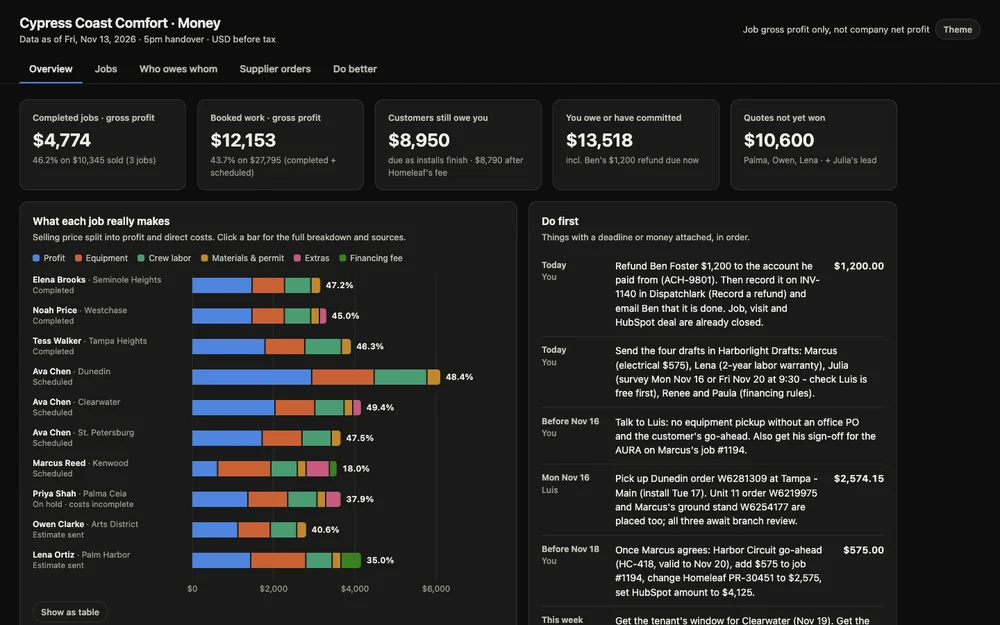
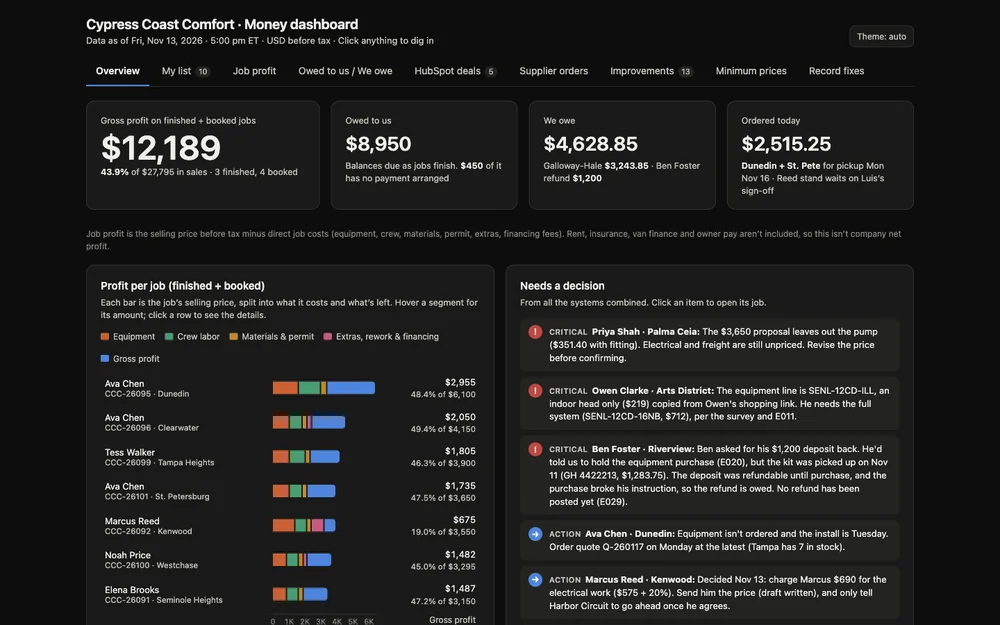
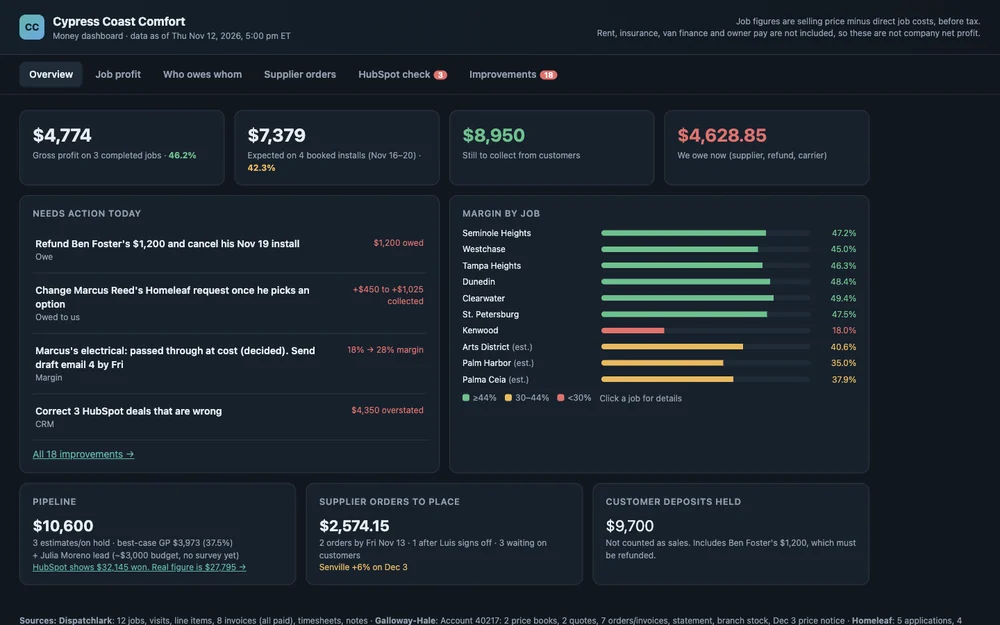
Task: create a dashboard

Company data HubSpot12 dealsOffice mail33 emails5 filesrates and receipts3 portalssupplier, crew visits, credits
All on Opus 5.5 HighD.A.V.E.bbHermes
Dashboard with all the data14 min28 min35 min
Your time at the screen4 min8 min10 min
Actions by hand134682
HubSpot✓Signed in by itself—You export the files from it by hand—You export the files from it by hand
All on Opus 5.5 HighD.A.V.E.bbHermes
Dashboard with all the data14 min28 min35 min
Your time at the screen4 min8 min10 min
Actions by hand134682
Data from HubSpotitselfby handby hand

After the dashboard was built

All on Opus 5.5 HighD.A.V.E.bbHermes
Supplier orders✓Placed 3✓Placed 2—Only a list of what to order
HubSpot deals✓Fixed them—Left them to you—Left them to you
A client cancelled an order✓Cancelled the order and the crew visit—The crew visit stayed on the schedule—The crew visit stayed on the schedule
Email drafts✓Right in the office mailbox, just press Send—In a file, to copy into the mail by hand—In a file, to copy into the mail by hand
All on Opus 5.5 HighD.A.V.E.bbHermes
Placed supplier orders32—
Fixed the HubSpot deals✓——
Cancelled a client’s order✓——
Created email draftsin the mailin a filein a file

What each one built

How we tested

Three uncut recordings, from Daniel’s first message to the finished dashboard. Who he is, how a robot played him at a real person’s pace, and the published studies behind every number.

What else sets Dave apart

Dave in Telegram

Every chat is its own topic in your group

  • Write from your phone: Dave works on the computer and replies right there
  • Voice messages, photos and files both ways: a finished report lands right in the topic
  • Site access and confirmations with one tap in Telegram

And also

Notes like in Notion

Any .md file opens as a clean document, not as code

  • Edit right in D.A.V.E.: headings, lists and tables
  • Links between notes don’t break when a file moves
  • The same files Dave reads: fix a document and he already works by it

In a week - a big update

Team access

Like Google Drive, but for AI: one brain for the whole team

  • Fix a skill or add a PDF to a project - and every Dave on the team knows right away and works by it
  • Edit documents together, as in Notion: version history, read access, comments or full editing
  • Your data on your server, and only yours. Dave sets up the server itself: plan, country, backups. In 30 minutes the “Collective brain” is running

Dave 24/7 on a server

Works while you sleep

  • The Linux version runs around the clock and has its own browser
  • Laptop closed - message Dave on Telegram, he answers and gets things done
  • Data in the cloud: if something happens to your computer, you lose nothing
Download D.A.V.E.Mac and Windows14 days free - the promo code is already in the link

How we tested

The whole take, from Daniel’s first message to the end. Each assistant on the same Mac, from zero, on Opus 5.5 High.

Who played the owner

Daniel MercerOwner of Cypress Coast Comfort · Tampa, Florida

Daniel Mercer owns Cypress Coast Comfort, an air-conditioning installer near Tampa. He knows his business well and is new to technology: before this he had only asked ChatGPT questions in the browser. He asked each assistant for one thing, a dashboard of where his money stands, built from HubSpot, his field-service app, his supplier’s portal, his lender, the office mail and the company folder.

A robot at a person’s pace

Daniel was played by a robot with human hands, answering only from a sheet of what a real owner knows. It moved the mouse, typed letter by letter, took his passwords from his password manager and his sign-in codes from his Gmail, all on video. Every second it spent as a person comes from a published study.

52words/min

Types letter by letter, as fast as an average person

Dhakal et al., CHI 2018 · 168,960 people
238words/min

Reads every answer before acting on it

Brysbaert, 2019 · 190 studies, 18,573 people
120people

Moves the mouse the way they did: the same paths, speed, wobble and overshoot

Antal, Fejer, Buza, IEEE SACI 2021
1.35seconds

Stops to think before each new piece of work

Card, Moran, Newell, CACM 1980

How each take went

  1. The same start. Before every take the Mac, its browsers and every account went back to zero.
  2. The same request. Daniel sent each assistant the same first message, word for word.
  3. The same model. All three ran on Opus 5.5 High.
  4. Only what an owner knows. Daniel answered questions about his business and signed in wherever he was asked. He never told an assistant how to build anything.
  5. One stopwatch. Time and actions are counted up to the dashboard with all the data. A password from the password manager counts as one action.

Sources

  1. Dhakal, Feit, Kristensson, Oulasvirta. Observations on Typing from 136 Million Keystrokes. CHI 2018Typing speed
  2. Brysbaert. How many words do we read per minute? Journal of Memory and Language, 2019Reading speed
  3. Antal, Fejer, Buza. SapiMouse: Mouse Dynamics-based User Authentication. IEEE SACI 2021Mouse movements, recorded from 120 people
  4. Card, Moran, Newell. The Keystroke-Level Model. Communications of the ACM, 1980Time to think and to press keys
  5. Woods, Wyma, Yund, Herron. Factors influencing the latency of simple reaction time. Frontiers in Human Neuroscience, 2015Time to notice that an answer has stopped
  6. Hinckley, Cutrell, Bathiche, Muss. Quantitative analysis of scrolling techniques. CHI 2002Scrolling
  7. Soukoreff, MacKenzie. Towards a standard for pointing device evaluation. IJHCS, 2004Where a click lands inside a button
  8. MacKenzie, Sellen, Buxton. A comparison of input devices in element pointing and dragging tasks. CHI 1991Dragging
  9. Antal, Buza, Fejer. SapiAgent: human-like mouse trajectories. IEEE Access, 2021Human-like mouse paths